Catalog Integration
Icebreaker integrates with catalogs that implement the Iceberg REST Catalog specification.
Your catalog must provide:
- Read access to table metadata for the namespaces you want to query.
- Write access if you want Icebreaker to register result tables back to the catalog. (You can write results as bare Parquet without catalog registration if you’d rather not grant write access.)
- Authentication that Icebreaker’s query executor pods can present — OIDC, API tokens, or AWS IAM, depending on the catalog.
- Network reachability from your EKS cluster to the catalog endpoint.
You configure the catalog endpoint, credentials, and warehouse identifier when you configure an Icebreaker Data Catalog in the Admin console.
Configuration schema
Section titled “Configuration schema”In the Admin console, navigate to Data Catalogs → New Data Catalog. Enter a name and description for your Iceberg catalog.
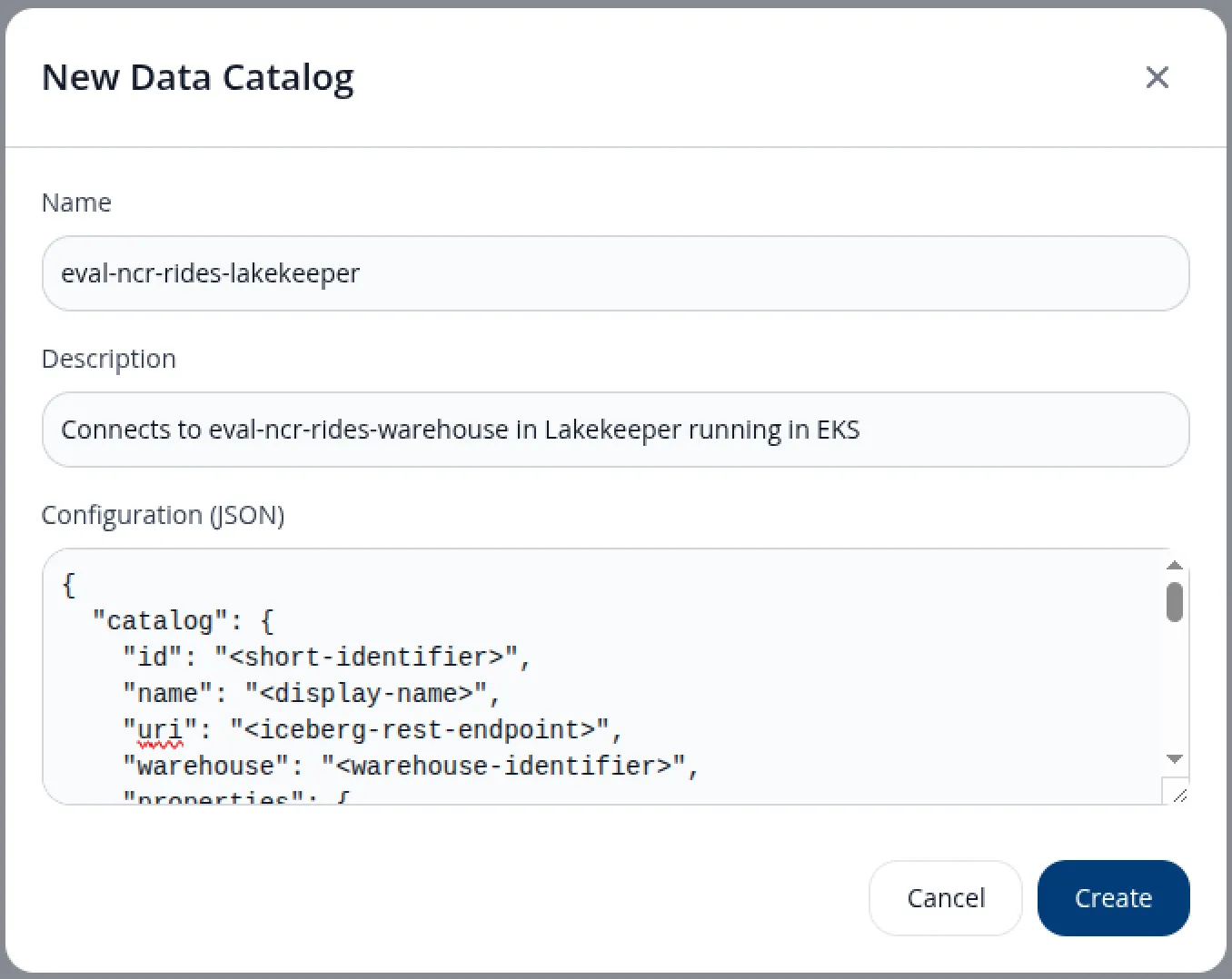
The Configuration (JSON) field carries two top-level sections:
catalog— how the Data Server reaches your Iceberg REST catalog and reads source-data tables from S3. The S3 access in this section is the same scope as theicebreaker-source-readIAM policy.storage— where and how the Data Server writes query result files to S3. The S3 access in this section is the same scope as theicebreaker-results-writeIAM policy.
{ "catalog": { "id": "<short-identifier>", "name": "<display-name>", "uri": "<iceberg-rest-endpoint>", "warehouse": "<warehouse-identifier>", "properties": { "s3.region": "<region>", "s3.endpoint": "<s3-endpoint-url>", "s3.access-key-id": "<access-key-id>", "s3.secret-access-key": "<secret-access-key>", "s3.allow_http": "false" } }, "storage": { "format": "parquet", "compression": "snappy", "path_prefix": "results", "properties": { "bucket_name": "<results-bucket-name>", "region": "<region>", "endpoint": "<s3-endpoint-url>", "access_key_id": "<access-key-id>", "secret_access_key": "<secret-access-key>" } }}Field reference
Section titled “Field reference”| JSON path | What it is | Where to find it |
|---|---|---|
catalog.id | Short identifier for this catalog connection within Icebreaker | You choose. Kebab-case convention (e.g., lakekeeper-prod). |
catalog.name | Human-readable display name | You choose. Shown in the Admin console. |
catalog.uri | Base URL of the Iceberg REST endpoint, no trailing slash | Lakekeeper: http://<host>/catalog. Glue: https://glue.<region>.amazonaws.com/iceberg. Polaris: your Polaris REST endpoint. See per-catalog examples below. |
catalog.warehouse | Warehouse identifier within the catalog | Lakekeeper: the warehouse UUID returned at creation (not the warehouse name) — curl http://<lakekeeper>/management/v1/warehouse to list. Glue: your AWS account ID. Polaris: the catalog name within your Polaris instance. |
catalog.properties."s3.region" | AWS region of the S3 bucket(s) holding your Iceberg table data | The region of your source-data bucket(s) from prerequisites step 2. |
catalog.properties."s3.endpoint" | S3 service endpoint URL | AWS: https://s3.<region>.amazonaws.com. MinIO / other S3-compatible: your service URL. |
catalog.properties."s3.access-key-id" | AWS access key with read permissions to the source-data bucket(s) | An IAM user/access key whose attached policies cover the source bucket — see icebreaker-source-read. |
catalog.properties."s3.secret-access-key" | Secret matching the access key above | From the same IAM user. |
catalog.properties."s3.allow_http" | Whether to allow plain HTTP for the S3 endpoint | "false" for AWS S3. "true" only for non-AWS S3-compatible stores running on HTTP (e.g., MinIO in test). |
storage.format | Output format for query result files | Currently only "parquet" is supported. |
storage.compression | Parquet compression codec | One of "snappy" (default), "zstd", "gzip", "none". |
storage.path_prefix | Key prefix within the bucket where result files are written | Any string. Convention: "results". |
storage.properties.bucket_name | S3 bucket where query results are written | The bucket from prerequisites step 2 (same bucket that holds your source tables). |
storage.properties.region | AWS region of the bucket | The region of the bucket. |
storage.properties.endpoint | S3 service endpoint URL | AWS: https://s3.<region>.amazonaws.com. |
storage.properties.access_key_id | AWS access key with write permissions to the results prefix | An IAM access key whose attached policies cover the bucket’s results prefix — see icebreaker-results-write. |
storage.properties.secret_access_key | Secret matching the access key above | From the same IAM user. |
Per-catalog examples
Section titled “Per-catalog examples”Lakekeeper
Section titled “Lakekeeper”Lakekeeper is the catalog used in Icebreaker’s demo environment and is validated end-to-end.
For a self-hosted Lakekeeper running in the same EKS cluster as the Data Server (the Deploy Lakekeeper for evaluation flow), use the in-cluster Service DNS name as the URI — there is no need to expose Lakekeeper publicly. Replace <region> and the access keys with values from your environment:
{ "catalog": { "id": "lakekeeper", "name": "Lakekeeper", "uri": "http://lakekeeper.lakekeeper.svc.cluster.local:8181/catalog", "warehouse": "<your-warehouse-uuid>", "properties": { "s3.region": "<region>", "s3.endpoint": "https://s3.<region>.amazonaws.com", "s3.access-key-id": "<access-key-id>", "s3.secret-access-key": "<secret-access-key>", "s3.allow_http": "false" } }, "storage": { "format": "parquet", "compression": "snappy", "path_prefix": "results", "properties": { "bucket_name": "<your-bucket>", "region": "<region>", "endpoint": "https://s3.<region>.amazonaws.com", "access_key_id": "<access-key-id>", "secret_access_key": "<secret-access-key>" } }}If your Lakekeeper instance has authentication enabled (the bootstrap with auth-on flow), generate a bearer token under Settings → Access tokens and add it to catalog.properties as "token": "<bearer-token>". The eval guide bootstraps with auth disabled, so no token is needed.
If you are evaluating Icebreaker using Icebreaker’s hosted demo environment, your Icebreaker contact will provide the full JSON pre-filled, including a token with read access to the TPC-H demo tables.
Other Iceberg REST catalogs
Section titled “Other Iceberg REST catalogs”These catalogs implement the Iceberg REST Catalog specification and are expected to work with Icebreaker, but have not yet been validated end-to-end. We’ll add configuration examples here as we validate each one:
- AWS Glue Data Catalog (when configured with Iceberg integration)
- Apache Polaris
- Snowflake Open Catalog (managed Polaris)
- Other Iceberg REST-compatible catalogs
If you are piloting Icebreaker with one of these — or another not-yet-validated catalog — reach out. We want to support it and can help work through any rough edges, and your pilot is what unblocks a validated configuration example for the next reader.
Where the catalog runs
Section titled “Where the catalog runs”Wherever you want. Common options:
- Inside the same EKS cluster (e.g., Lakekeeper as a pod).
- Inside the same AWS account, outside the cluster (e.g., Glue).
- External SaaS (e.g., Snowflake Open Catalog).
Icebreaker does not care, as long as query pods can reach it and authenticate.
Result tables and result storage
Section titled “Result tables and result storage”Icebreaker writes query results as Parquet files in an S3 bucket you specify. You have two options for the results’ Iceberg presence:
- Catalog-registered results. Icebreaker registers the result Parquet as an Iceberg table in a results namespace you control. Useful when result sets are reused or chained.
- Unregistered results. Icebreaker writes Parquet to S3 and returns a manifest pointing at the files. Useful for one-shot client reads.
You choose per-instance, per-query, or per-capacity-policy depending on your access patterns.